Set each kid's lines.
What's fine for the 9-year-old is a hard pass for the 4-year-old, and every parenting app that gives you one setting for "kids" is pretending otherwise.
 The same video comes back Clean for one of your kids and Hard Pass for the other, and both answers are right.
Where they live.
Two taps from anywhere in the app.

-
1
Open the Kiddos tab.
Your roster: age, shows in rotation, brain diet.
New kid? The + in the corner. Name, age, and a face. That's the whole form.
-
2
Tap the kid, then find Safety Thresholds.
Seven sliders, one per thing parents worry about. Above them the shortcut, Tune it in 7 quick questions; below them the reset to that age's defaults.
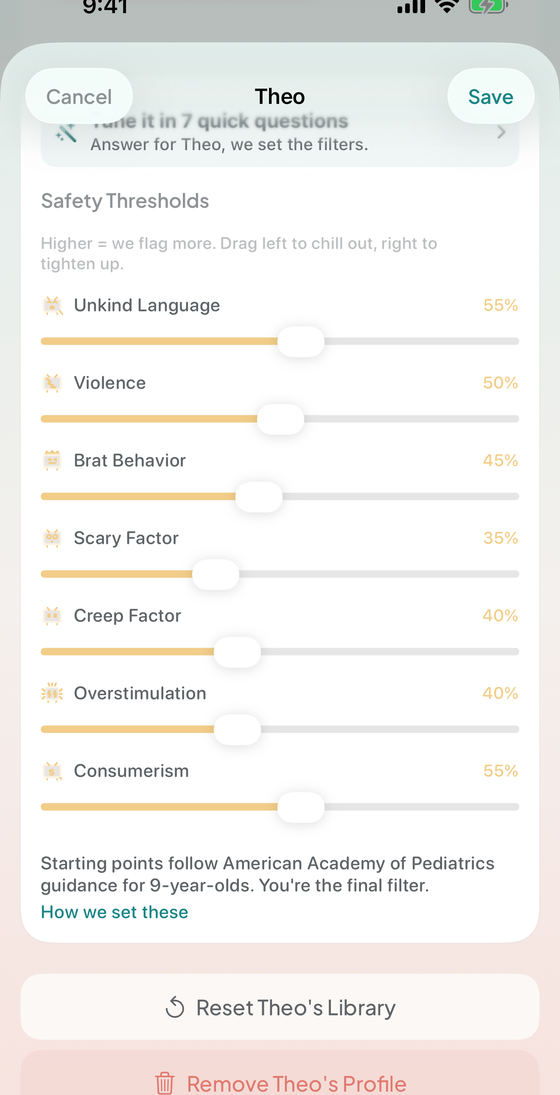
Overstimulation, dragged from 40% to 70%. The number moves with your thumb.
Higher means we flag more. Right to tighten, left to chill out. At 95% we call it out at the first whiff; at 35% it takes a lot.
Strictness dials, not on/off switches.
The seven, in plain words.

-
Unkind Language
Bullying, name-calling, profanity, mean-spirited humor, mockery, humiliation as comedy. The banter that's really just meanness with a laugh track.
"I don't want my kid talking like that." -
Violence
Fighting, weapons, destruction, physical aggression, and the dangerous stunts and challenges that come back as a dare at school.
"I don't want my kid seeing that." -
Brat Behavior
Disrespect to adults, whining, entitlement, tantrums played as funny, the whole "savage" thing. The stuff that shows up at your dinner table the same night.
"I don't want my kid acting like that." -
Scary Factor
Fear and dread. Monsters, jump scares, peril, dark imagery, tense music. The dial that decides whether tonight has a 2am visitor in it.
"Is this going to fuel nightmares?" -
Creep Factor
The uncanny one. Adult themes wearing a kids' costume, weird adult-child dynamics, innuendo aimed over a kid's head, and the disguised content engineered to slip past anything that scans for a cartoon.
"Something feels off about this." -
Overstimulation
Rapid cuts, constant yelling, cranked reactions, pacing built to hijack attention rather than hold it. Not a taste question. It's the one most tied to what a kid is like when the screen goes off.
"My kid turns into a zombie after this." -
Consumerism
Stealth ads, unboxing as marketing, sponsored "reviews" of toys, merch pushing, and "use my code" schemes pointed at people who can't spot selling intent yet.
"My wallet felt that one."
The fast way: seven questions.
Nobody should have to learn what "0.4 consumerism" means. Answer questions about your actual kid and we do the math.

-
1
Tap "Tune it in 7 quick questions."
A minute, on your phone, and it never asks you about a threshold. Every question is one you have already watched happen:
"After fast, flashy shows, Theo is…" Bouncing off the walls. A bit amped, settles fast. Totally unbothered.
The rest cover scary stuff, slapstick, sass, toy-commercial shows, their birthday, and which growth you want more of.
-
2
Read what your answers did.
Every threshold comes back strict, balanced, or relaxed, with the growth you prioritized under it.
The quiz writes the sliders. It never locks them.
Where the starting numbers come from.
A new profile opens at thresholds tuned to that kid's age, anchored to published American Academy of Pediatrics policy statements.
-
Younger means stricter, across the board.
A toddler starts near the top of every dial; a 9-year-old starts a long way down. The exact numbers are on the sliders.
-
Two dials stay strict longer than the rest.
Consumerism: kids under about 8 can't reliably tell when something is selling to them. Overstimulation: fast-paced content measurably knocks preschool executive function around. Published findings, not house opinions.
The four anchors behind the defaults -
What "pediatrician-informed" does not mean.
The AAP has not reviewed or endorsed Strangey Dangey, and no pediatrician signs off on individual verdicts. These are starting points. You're the final filter.
When a call feels wrong, move the dial.
You never have to guess which slider was responsible.
-
After each kid's first screening, we ask.
Three chips under their row: Yep, Too strict, Too loose. Once per kid, at the only moment you have an opinion.
-
Then you get a specific fix, not an apology.
Say too strict and you get the exact change: "Overstimulation 70 → 60%", then Apply or Not now.
-
That's separate from telling us we blew it.
Moving your dials changes your household. Flagging a verdict tells us. Use either or both.
How to flag a verdict
Two more things on this screen.
Neither is a safety filter, and both change what you get.
-
Growth priorities.
Curiosity, empathy, creativity, learning, big feelings, problem solving, getting them moving. Pick a couple and the app raises the bar for those when it ranks what to watch and hunts for gaps.
How the Brain Diet uses them -
Free vs Pro on this screen.
Free runs on the age-based defaults, with every slider visible so you know what's applied. Pro unlocks dragging them per kid.
Next.
The filters decide the verdicts. These decide what you do with them.
Know what's inside before hitting play.
Download on theApp StoreFree on iPhoneHow we set the defaults